Four jobs of testing. One place for each.
Inside a project, TestPlum has a place for every job: Tests to know what to test, Runs to test it, Failures to understand what broke, and Release to decide. Everything else appears where you need it.
Know what to test
TestPlum keeps every test as structured steps with an expected result per step, in folders you shape, with a version for every edit. Tests link to requirements, and coverage is worked out from the latest real results, so you can see which promises are verified, failing, not run yet or not covered at all.
Tests in detail 02 · RunsTest it
A TestPlum run starts from a suggestion: tests that failed or were blocked last time, never ran, changed since they ran, or are critical. Testers record results step by step from the keyboard, everyone sees progress live, and automated results from Playwright and CI land in the same append-only history.
Runs in detail 03 · FailuresUnderstand failures
TestPlum groups failures that share a cause, so ten tests failing for one reason are one problem. Each group is sorted as a product bug, a broken test, an environment problem or a flaky test, with the reasons shown. You file one bug per cause, and for a broken automated test TestPlum can propose a fix and prove it passes before a person approves it.
Failures in detail 04 · ReleaseDecide whether to ship
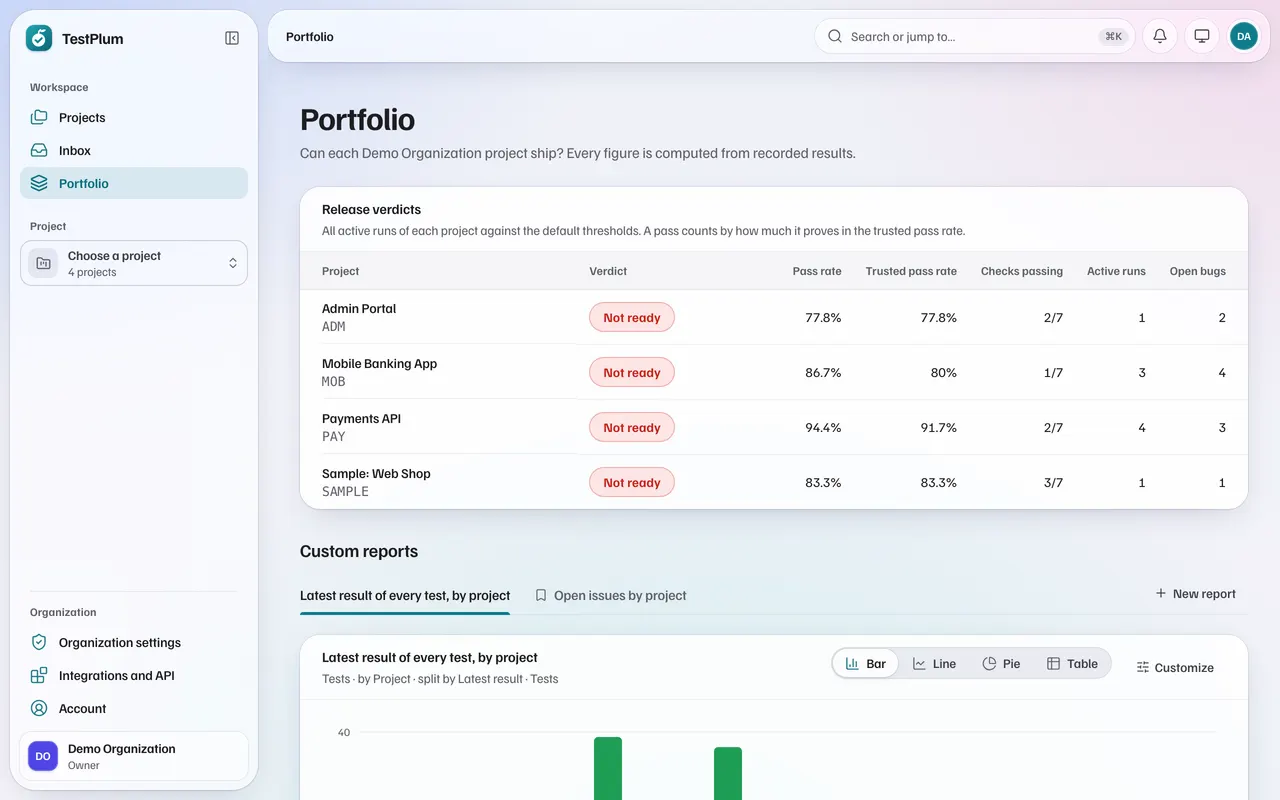
TestPlum turns recorded results into one release verdict: ready or not ready. The verdict comes from checks with thresholds you agree in advance, each pass counts by how much it really proves, and every failing check links to the place to resolve it. The portfolio shows the same verdict for every project.
Release in detailAcross projects
Every project's verdict, side by side
The portfolio shows each project's release verdict with its pass rate, trusted pass rate, checks, active runs and open bugs, so a lead sees where attention is needed without opening each project.
Everywhere
The details that make it quick
- ⌘K
Search and jump
Find any test, run, bug or requirement by name or key, or jump to any place, from one box.
- 1–9
Keyboard first
Record results with number keys, move with J and K, and add steps without reaching for the mouse.
- ●■◆
Results by shape
Passed, failed, blocked, skipped, not run and rerun each have a shape as well as a colour, readable in greyscale.
- LIVE
Live runs
Open run pages update as results arrive from people, runners and CI.
- ☾
Light and dark
Both themes are designed, not inverted, and on phones the sidebar opens as a drawer.
- ROLES
Roles and an audit log
Project roles from 14 permissions, testers limited to their own tests, and a log of administrative actions.
Find out whether your next release is ready
Create a workspace, import your tests or write a few, and record a run. Everything on this site is in the product today.